mirror of
https://github.com/VallierDev/uu-remote-linux.git
synced 2026-11-16 16:50:41 +01:00

2.7 KiB
2.7 KiB
远程协助(实验性)、统一主窗口和应用图标。/ Remote assistance (experimental), a unified main window and an app icon.
新增 / Added
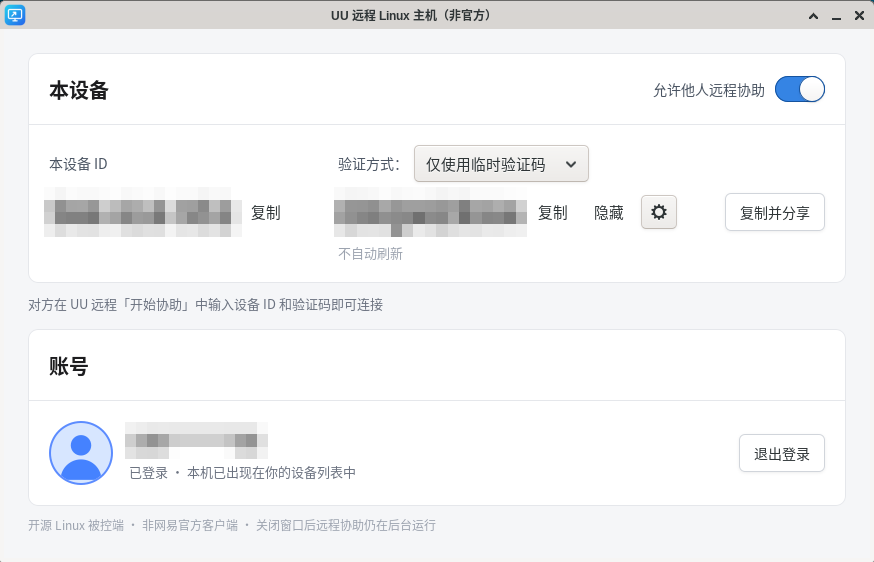
- 远程协助(实验性):和官方客户端一样,把「设备 ID + 验证码」发给别人,对方在 UU 远程的「开始协助」里输入即可连接本机。
- 未登录也能用(访客身份);登录后同样可用,设备 ID 不变。
- 「允许他人远程协助」开关(默认关闭);验证方式:仅临时验证码 / 仅自定义验证码(8–16 位字母+数字)/ 两种都可以; 临时验证码刷新:每次远控结束 / 每小时 / 每 12 小时 / 每 24 小时 / 不刷新;ID 和验证码各有「复制」按钮,另有「复制并分享」。
- 协议参照官方 Windows 精简版被控端实现。✅ 用官方 Mac 客户端实测:访客连接、错误验证码被拒绝、用完自动换码、关闭后不可连接、 登录与退出登录的切换。⚠️ 登录状态下用另一个账号发起远程协助尚未实测(同账号设备之间不能互相协助,这是官方限制)。
- 安全:拿到 ID 和验证码的人可以完全控制这台电脑,只发给信任的人;验证码只显示在本机窗口,不写入日志。 Remote assistance like the official client (device ID + code), before and after sign-in. Verified with the official Mac viewer except signed-in assistance from another account.
- 统一主窗口:一个窗口包含「本设备」(远程协助)和「账号」:未登录时显示扫码二维码,登录后显示账号(手机号打码)和「退出登录」。
扫码登录或退出登录后,主机会自动切换模式。已登录的后台服务默认隐藏窗口,用
uuremote-server show或应用菜单打开;关闭窗口只是隐藏。 One window with remote assistance and the account (QR before sign-in, account + sign out after). - 应用图标和启动项(#13):
contrib/desktop/里有图标和.desktop文件,安装后应用菜单里会出现「UU 远程 Linux 主机」。 App icon and desktop launcher.
修复 / Fixed
- 服务模式下扫码登录时,二维码(登录凭证)不再打印到标准输出(会进入系统日志)。/ The QR is no longer printed to a service's stdout.
下载 / Download
uu-remote-linux-v0.1.11-x86_64-linux.tar.gz:X11 版可执行文件(x86_64,glibc ≥ 2.35),附带 contrib/。
非官方项目,与网易无关。 / Unofficial, not affiliated with NetEase.